Returning SharePoint Online TermSet in a tree structure using SharePoint Framework SPFx

Recently, I needed to render out a large list of items stored in our SharePoint Online metadata TermSet into a tree structure in SharePoint WebPart.
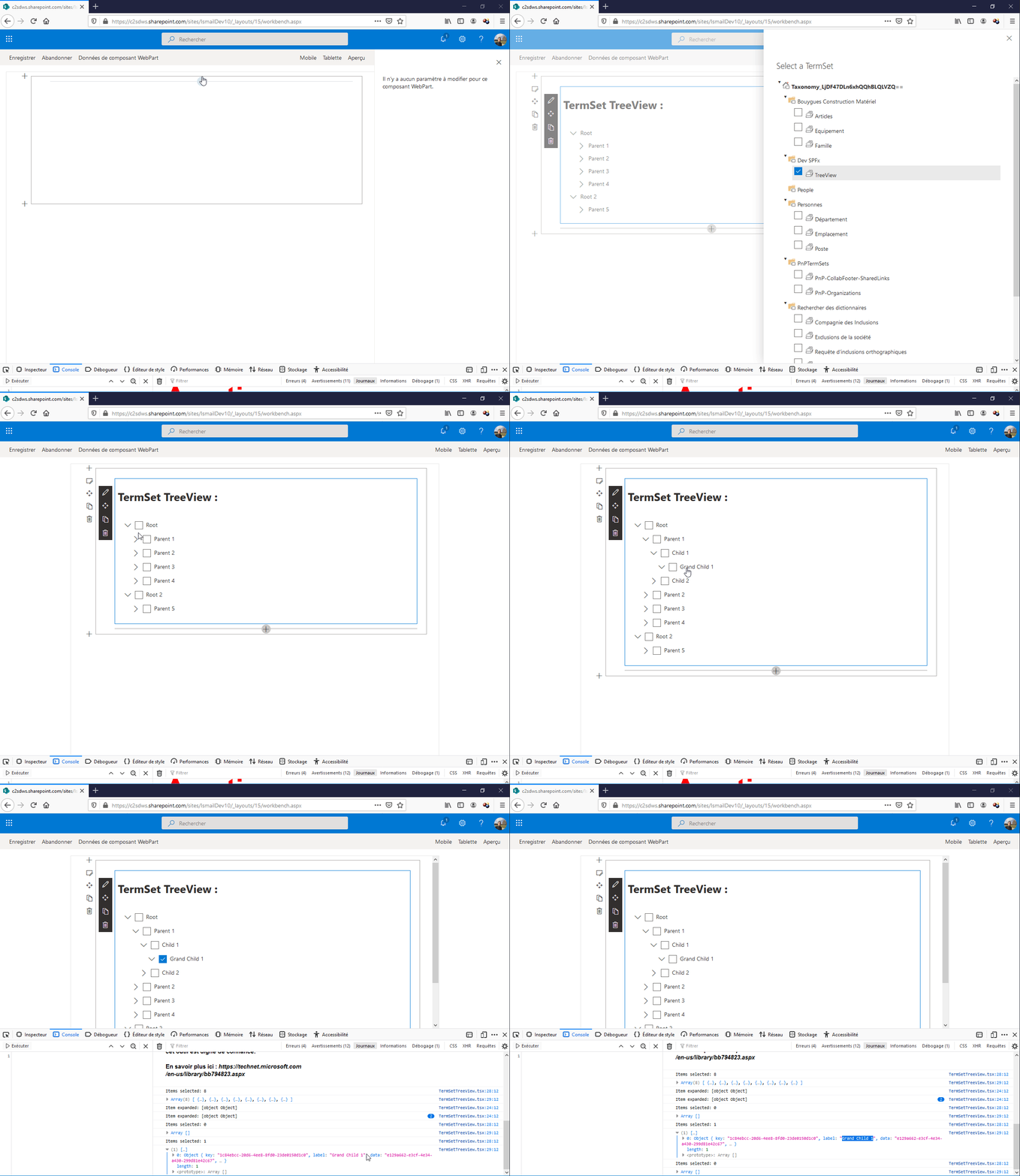

I created a termset, added terms, then added additional terms within each parent term. But when it came to rendering all of these terms out using « sp-taxonomy.js », I realized that there was no way to get the data back structured in the same hierarchy that we inputted.


To fix this issue, I wrote utility methods that get the terms from the term set, create a hierarchical tree of terms based on their path.


  • Function to get all terms from a term store


public async getTermSetTags(_siteCollectionUrl,_termStoreGuid,_termSetId){
const _taxonomy = new Session(_siteCollectionUrl);
const store = await _taxonomy.termStores.getById(_termStoreGuid).get();
const termSet: ITermSet = store.getTermSetById(_termSetId);
const termsWithData: (ITermData & ITerm)[] = await termSet.terms.select('Id', 'Name', 'Parent').get();
return termsWithData;
}

  • Function to create a tree structure from my terms list


public getTermSetTree = (
data = [],
{idKey='id',parentKey='parentId',childrenKey='children'} = {}
) => {
const tree = [];
const childrenOf = {};
data.forEach((item) => {
const { [idKey]: id, [parentKey]: parentId = 0 } = item;
childrenOf[id] = childrenOf[id] || [];
item[childrenKey] = childrenOf[id];
parentId
? (
childrenOf[parentId] = childrenOf[parentId] || []
).push(item)
: tree.push(item);
});
return tree;
}


You can find the source code of the SPFx WebPart in github.


How to force a full Reindex in SharePoint with PowerShell


In SharePoint , you may want to trigger a complete re-indexing of your site. This manipulation is possible with the site administration.


You can do the same thing with PowerShell by changing the value of the web property vti_searchversion

Below is a PowerShell function that re-index the entire site collection, it will update the vti_searchversion value, which will trigger a complete site collection re- indexing that will be considered in the next crawling.

function ReindexSite{
      param($web)

      Write-Host -ForegroundColor Yellow " Reindexing Site : " $ web.Title
      [int] $version = 0
      $propertyBag = $ web.AllProperties
      if ($propertyBag.ContainsKey("vti_searchversion") -eq $true)
      {
            $version = $propertyBag["vti_searchversion"]
      }
      Write-Host "Current search version: " $version -ForegroundColor Yellow
      $version++
      $propertyBag ["vti_searchversion"] = $version
      Write-Host "Updated search version: " $version -ForegroundColor Green
      $web.Update()
      foreach ($subWeb in $ web.Webs)
      {
            ReindexSite($subWeb)
      }
}

You can do also the same thing in SharePoint Online with this script:


function ReindexSite{
       param($web)

       $subWebs = $web.Webs
       $clientContext.Load($web)
       $propertyBag = $ web.AllProperties
       $allProperties = $web.AllProperties
       $clientContext.Load($propertyBag)
       $clientContext.Load($subWebs)
       $clientContext.ExecuteQuery()

       Write-Host -ForegroundColor Yellow " Reindexing Site : " $ web.Title
       [int] $version = 0
       $propertyBag = $ rootWeb.AllProperties
       if ($propertyBag.FieldValues.ContainsKey("vti_searchversion") -eq $true)
       {
             $version = $propertyBag["vti_searchversion"]
       }
       Write-Host "Current search version: " $version -ForegroundColor Yellow
       $version++
       $propertyBag["vti_searchversion"] = $version
       Write-Host "Updated search version: " $version -ForegroundColor Green
       $web.Update()
$clientContext.ExecuteQuery()
       foreach ($subWeb in $subWebs)
       {
             ReindexSite($subWeb)
       }
}